
Widgets let you bring your campaign or raffle to another website or live stream. They should be configured from the right item’s tools and tested where they will be displayed.
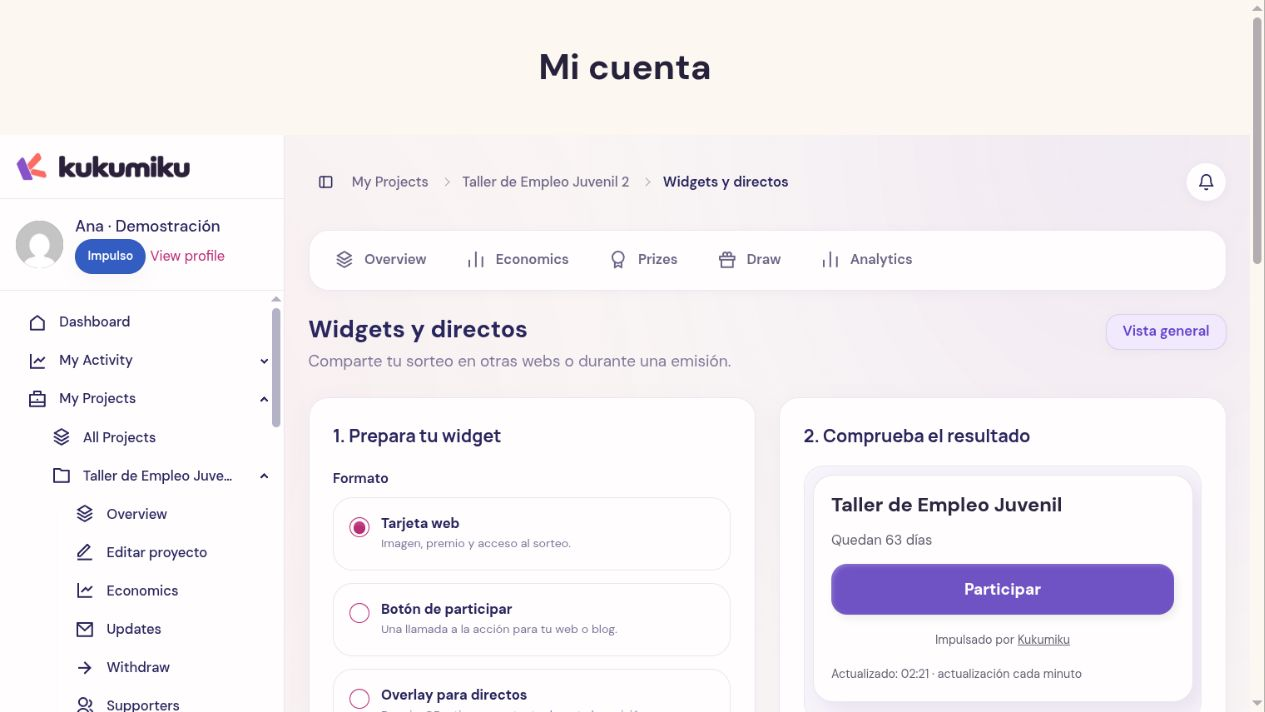
Embed on a website
- Open the outreach tools for the campaign or raffle.
- Find the widget or available embed option.
- Set up the format, appearance, and visible elements, then click Update preview.
- Under Share or embed, copy the generated code and paste it into a block or section of your website that supports this type of embed.
- Publish or preview the destination page and check that it works properly.
If you don’t manage the destination website, share the code with whoever does. Some editors restrict embeds: pasting code into a regular text paragraph may display code instead of the widget.
Check readability on mobile and make sure the link leads to the right campaign. The information should match the public page.
Set up a live stream
In Widgets and live streams, you can choose formats such as Web card, Enter button, or Live stream overlay depending on the module. For a raffle, the overlay can show the prize, a QR code, and the time remaining. Configure the title, button text, appearance, and a channel to track outreach.
Update the preview and copy the widget URL. If your broadcasting software supports a browser source, add that URL following its setup steps. Widget views alone do not count as visits to the raffle page.
Check the size, contrast, and layout next to the video. Do a test run before going live and verify the actual updates displayed; do not announce an interactive feature you haven’t tested.
Keep your data secure
Only use information intended for the public. Do not share links from the private dashboard, donor exports, or URLs containing credentials. If the tool flags a link as private, review the instructions before sharing it.
Troubleshooting display or functionality issues
Check the project plan and permissions, the public status of the campaign, and whether the website or software supports embeds. Let support know which widget you’re trying to use, where you embedded it, and what error you see, without sharing passwords for your broadcasting service.