
Errors in name, ID document, or legal entity name can prevent a certificate from correctly reflecting a contribution. Check both your current details and the ones associated with the transaction.
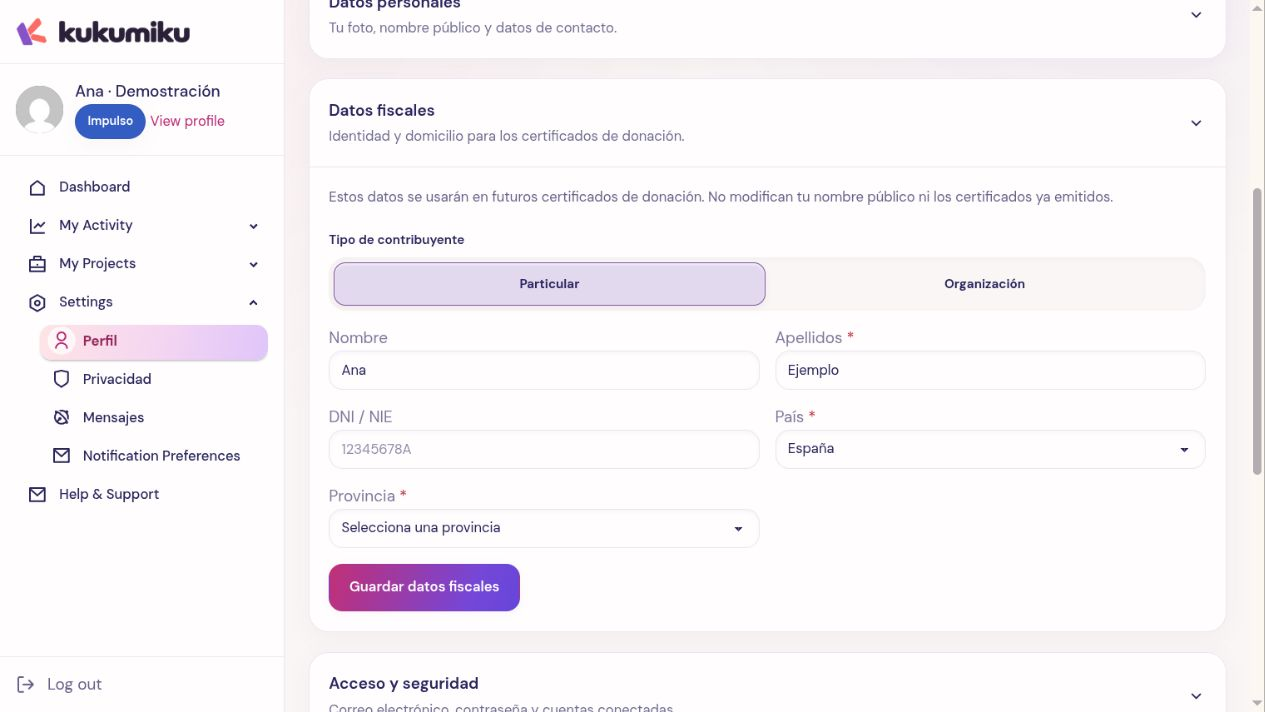
Review your details
Open Profile and check whether you are acting as an individual or as an organization. Review first and last name or legal entity name, DNI/NIE or CIF, country, and province where applicable. Save your changes and check that they were saved.
Updating your profile helps prepare for future transactions, but it does not mean that a previous request or an already issued document has been automatically updated.
Request a correction
- Locate the contribution and keep its reference, date, and amount.
- Check which detail is incorrect and what it should be.
- Contact support or the issuing organization through the channel indicated for the certificate.
- Explain whether you are requesting to correct a pending request or an already issued document.
- Review the corrected document once they confirm it is available.
Provide only the necessary details through the appropriate channel. Do not include full tax information in public campaign comments or in messages open to other people.
If you didn’t request a certificate when donating
Check whether that contribution allows you to add it later. Identify the transaction so its terms and available information can be reviewed. There is no guarantee that any contribution can be certified later or that a missing option can be activated from your profile.
If the document still doesn’t appear
Check that the contribution is completed. The download only appears when a document is available. A submitted request does not mean immediate issuance. Keep the support response and avoid submitting duplicate requests with different details while the first one is being resolved.