
A campaign explains what you want to achieve, who will do it, and how the money will be used. Gather this information before opening the form: it will help you write a clear and consistent presentation.
Preparing the materials
Define the title, a summary explaining the need, and a description of where the funds will go. Prepare a cover image you have permission to use, additional images, and a video if it provides helpful information. Avoid publishing documents with unnecessary personal information.
Have the organizer’s identity, location, budget, dates, and terms of the funds raised on hand. Check which project will be responsible for the campaign and what options its plan allows.
Completing the form
- Open the option to create a campaign from your account or project. If prompted, link it to an existing project or prepare a new one with the required details.
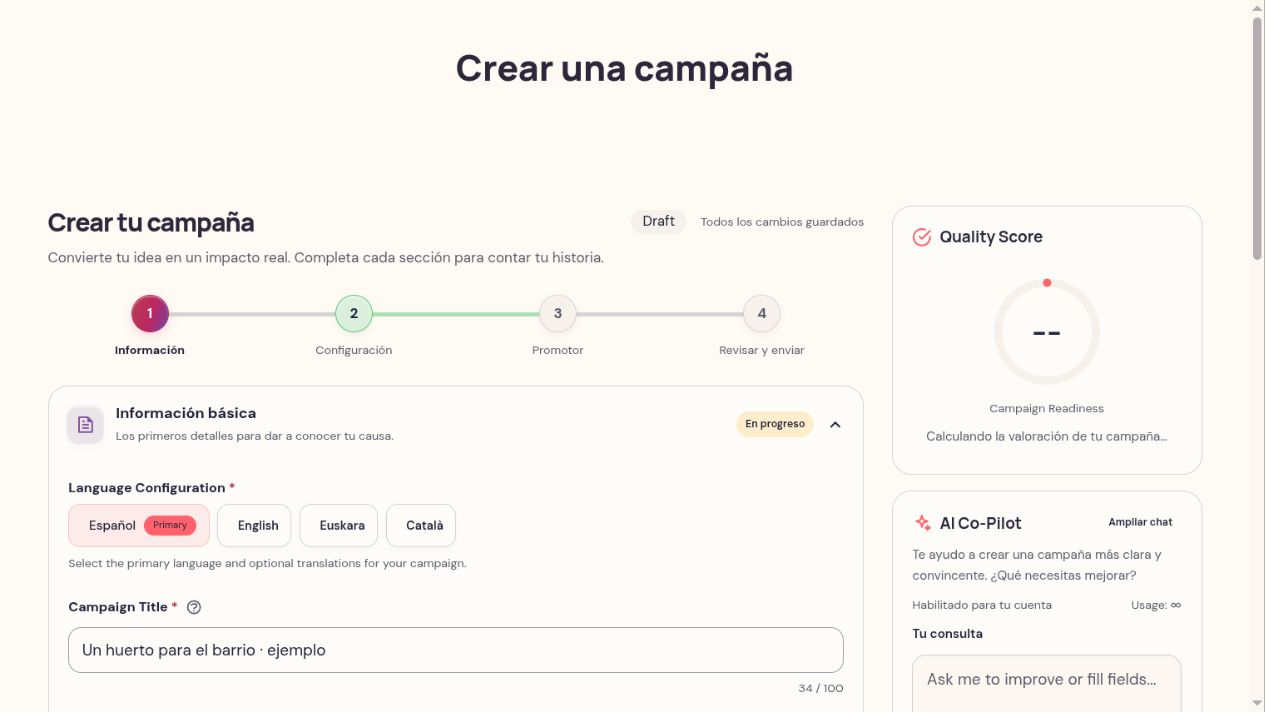
- In the campaign information, fill in the title, summary, description, category, and visual materials.
- In settings, review the goal, dates, format, and available collaboration options.
- Complete the organizer details and the requested transparency information.
- Review everything before submitting.
Required fields and form validations will let you know what is missing. Some options depend on the modality or the services enabled for the project.
Save and continue
Save your draft and make sure the form confirms it has been saved before leaving. When you return, open the existing campaign to continue; do not create a new one for each work session.
Saving does not publish the campaign or necessarily submit it for review. Use the submit action once all details are ready.
Using the form assistance
If the readiness score and AI assistant appear, use them to find pending fields or improve your text. For instance, you can ask: “Summarize the need, how funds will be used, and the impact in one clear paragraph.” Review any suggestions before adding them: do not include results, testimonials, or commitments you cannot verify. The score guides your preparation and does not replace review or guarantee publication.
Review as someone who wants to collaborate
Make sure it is clear what issue you are addressing, what you will achieve, and what will happen with the money. Check image legibility and consistency between budget, goal, and dates. If there are multiple languages, review each version. The final review is the time to correct mistakes before requesting publication.