
Privacy options control the public display of certain activity. They are independent of the private data needed to manage payments, projects, and documents.
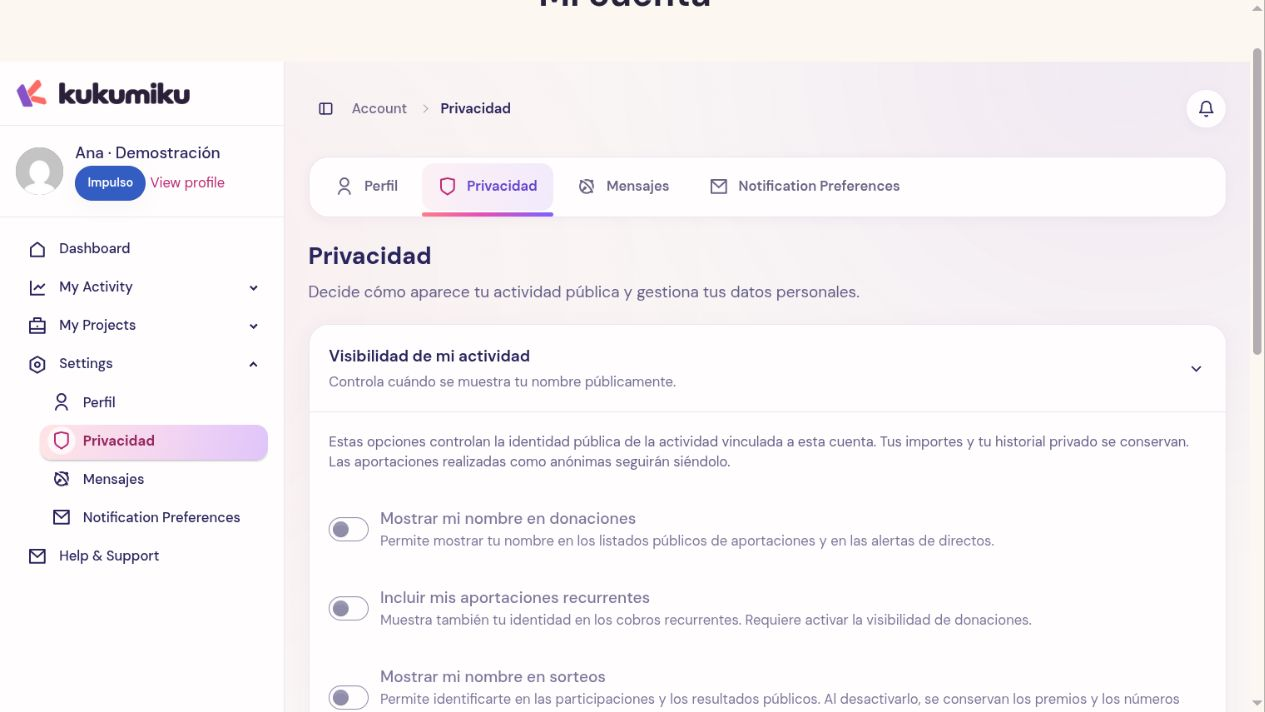
Review visibility
- Log in to your account and open Privacy.
- Read the available options for donations, recurring contributions, and raffles.
- Choose what you want to show and click Save privacy.
- Also check the visibility selected for a specific contribution when the process offers that option.
Publishing your projects is managed from My Projects; these settings do not hide their pages.
Hiding your name from a public list does not delete the data required to process the payment or handle an issue. An organizer or the platform may need private information to manage the transaction.
Download your data
Use Download my data within Privacy while logged in. A JSON download is prepared so you can review the information included in the export. Keep that file in a private place: it may contain data from your account and your activity.
If the download fails, log in again and repeat the request from the screen. If it persists, report the error to support.
Prepare to close your account
Before requesting it, review your recurring contributions, projects, and pending transactions. The screen displays the conditions preventing you from continuing and links to resolve them. Closing your account should not be used as a substitute for canceling a collaboration or resolving a pending obligation.
You need a password to confirm the closure. If your account does not have one, first set one from Profile following the provided flow.
Confirm account closure
When you are ready to continue, use Close my account, enter your password, and type DELETE as requested. Read the confirmation before accepting. Closing your account does not mean all data from past transactions will be erased: certain information may be retained or processed differently due to applicable obligations. If you need clarification on your case, contact support before confirming.