
The public funds raised figure and the money available for withdrawal answer two different questions. To review your project’s funds, use its financial dashboard and check the status of transactions, fees, and withdrawal requests.
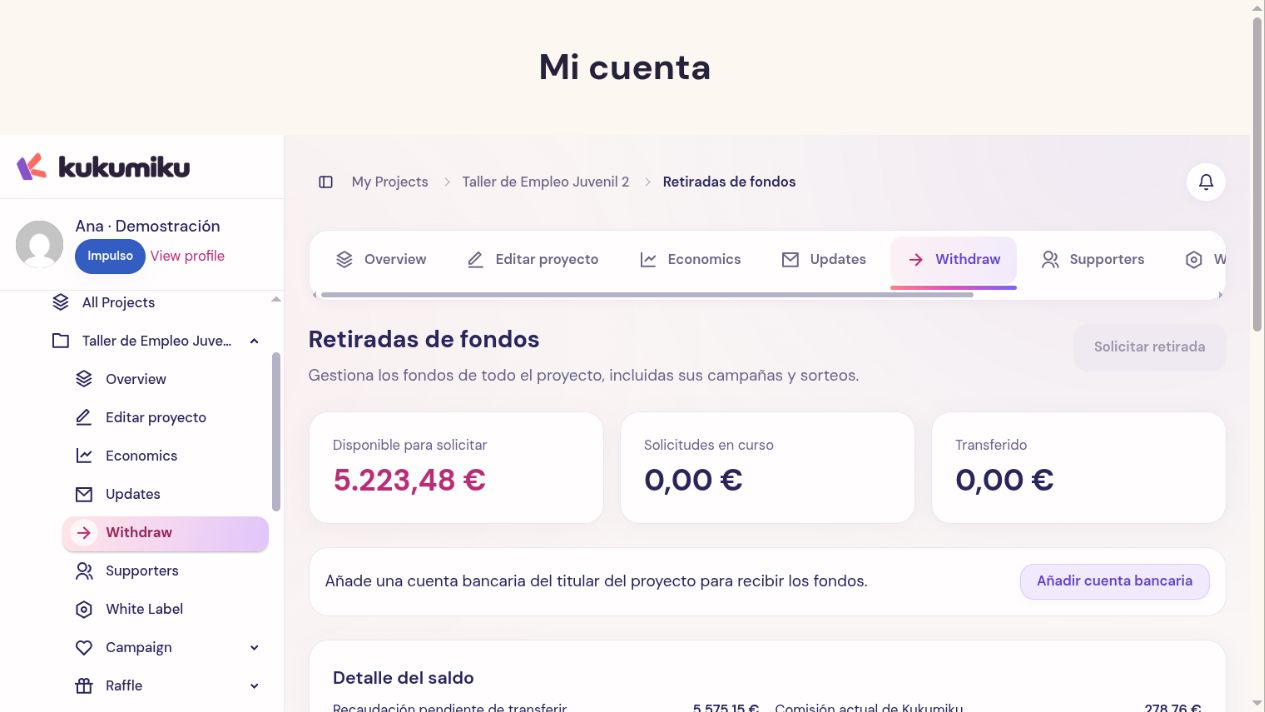
Understanding the numbers
Funds raised summarizes the contributions counted by the campaign based on their status. Available balance accounts for the transactions that can be used and any applicable adjustments. Pending transactions still require confirmation.
Fees and other costs can affect the net amount. Their conditions depend on the service, payment method, and project settings; do not calculate net amounts by applying an assumed percentage.
Checking a discrepancy
- Select the correct campaign or project.
- Check the report’s date range and filters.
- Distinguish between completed, pending, failed, and refunded contributions.
- View the available cost breakdown.
- Review withdrawals that have already been requested or are in progress.
In Withdrawals, the Available to request figure is the reference for a new request. The system re-checks the balance when processing it and deducts any amounts already committed to other requests.
Reconciling with your records
If you have an export feature available, use the same screen filters to get a comparable report. Keep the reference numbers of any transactions you review. External income recorded as such must be distinguished from money processed by Kuku.
When you spot a discrepancy, identify the item, time period, and specific references before contacting support. Avoid comparing the public historical total with the current balance without taking withdrawals and adjustments into account.
Communicating funds raised
When sharing results, specify whether you’re referring to funds raised, net balance, or transferred money. This distinction helps explain to supporters how the project is progressing without presenting a withdrawal request as an already completed transfer.