
Withdrawals are managed from the project by its account holder or an authorized administrator. Before requesting funds, check the balance and ensure the bank destination meets the account holder and verification requirements.
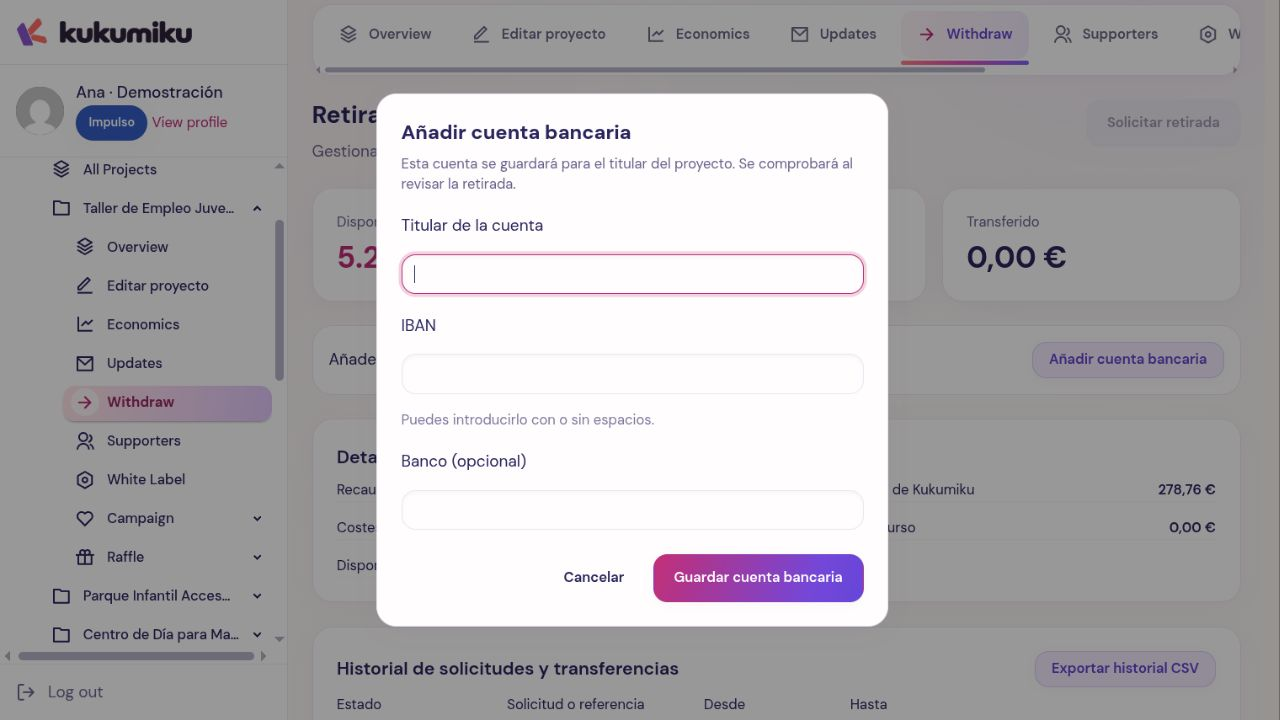
Prepare the bank account
Under Withdrawals, use Add bank account if you need to register a destination. Enter the account holder, IBAN, and bank if applicable, and click Save bank account.
Saving an account does not mean it is automatically verified. To use it, it must be active, meet the required account holder criteria, and pass the relevant verification checks. If it doesn’t appear among the supported destinations, review its status or check what is missing.
Create the request
- Check Available to request.
- Click Request withdrawal.
- Enter the amount and choose a valid bank account.
- If you want to request the full available amount, use Use full available balance when it appears.
- Click Review request, verify the details, and confirm.
Respect the minimum displayed on the screen. The balance is re-verified upon submission; a figure seen earlier may have changed due to new requests or transactions.
Track its processing
Check Pending requests and the History of requests and transfers. A request can go through Requested, In review, and In transfer before appearing as Transferred. It can also appear as Rejected or Canceled.
Do not assume submitting the request means immediate payout. If a verification check is required or it gets rejected, review the reason and make the necessary corrections before submitting another one.
Cancel or report an issue
If the request still allows it, use Cancel request and check the final status. A transfer that is already being processed may not allow cancellation from the dashboard.
If the status or banking details need review, contact support with the withdrawal reference. Do not post a full IBAN in campaign comments or promise a payout date that hasn’t been confirmed.