
Selecting winners is a permanent action. Before running it, review the published rules, prizes, raffle status, and any issues that might affect eligible entries.
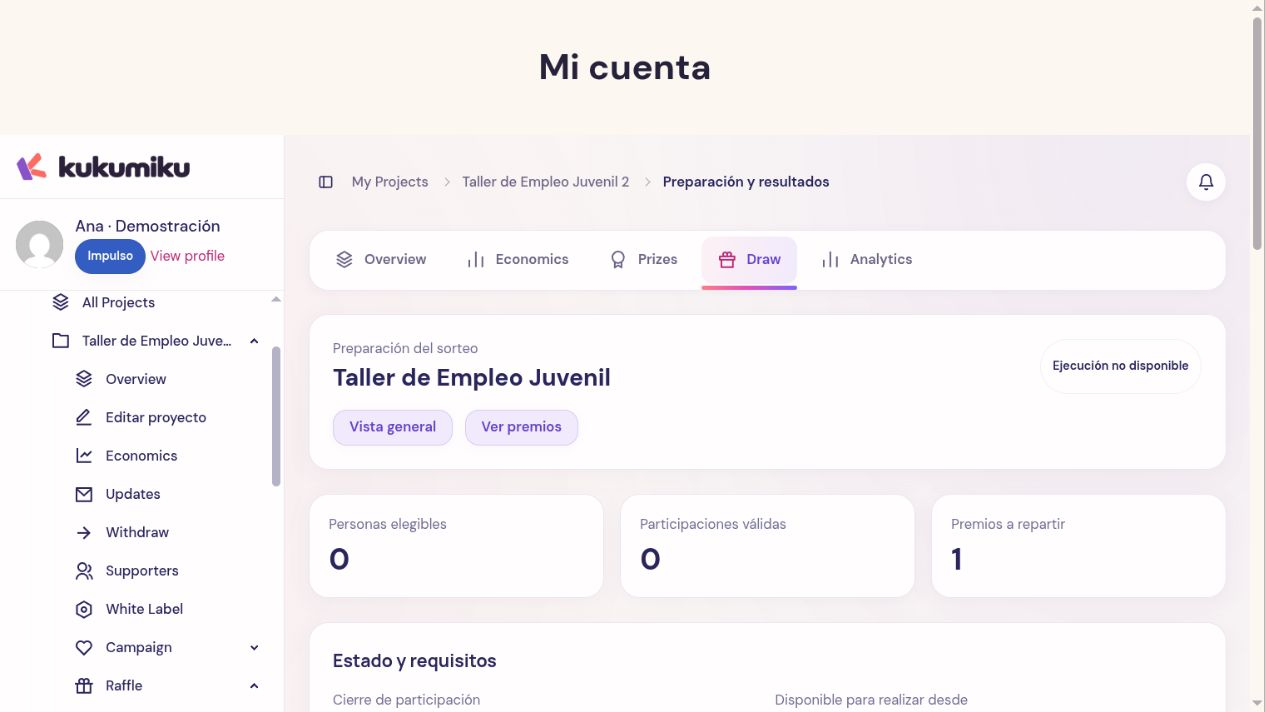
Review preparation
- Open the raffle from its project dashboard.
- Go to Preparation and results.
- Review the closing and the indicated checks.
- Check the prizes, expected winners, and configured alternates.
- Resolve any blockers or wait until the time indicated on screen.
There may be a waiting or reconciliation period after closing. Use real dashboard information; do not promise that the selection will run exactly when the public countdown ends.
Confirm the selection
The authorized organizer can run the raffle once all requirements are met. Click Review and confirm raffle, check the summary, and use Confirm and run raffle only if everything is correct.
Do not use this action as a preview or as a test. First, check the selection method: a random raffle per person and one weighted by entries do not grant the same odds.
Check the results
After running the selection, check the recorded results, the winners, and the alternates. Also review the acceptance statuses and available notifications.
Selection does not equal prize delivery. Each winner must follow the communicated process, and management must continue until all acceptances, rejections, or pending spots are resolved.
Manage post-raffle issues
If someone declines or fails to accept within the applicable deadline, the system may allow you to proceed with alternates according to the rules. Review the available action and its effect before confirming it. If there are no alternates left or there is an unresolved issue, request a review; do not announce a replacement that is not yet recorded.